ArcPanel can carry your brand: the name in the browser tab, on the login page and in e-mails, the sender of the panel's e-mails, and the logo. Open Configure under Server, then White Label.
Names and e-mails
| Field | Where it appears |
|---|---|
| Application Name | The browser tab ("Page · Name"), the login, password reset and two-factor pages, the logo's text, and e-mails |
| Email subject | The subject of the panel's e-mails; {{subject}} is the subject itself, {{appname}} the name, {{hostname}} the host name |
| Sender name | The sender's name of the panel's e-mails; the application name when empty |
| Sender email address | The sender's address; noreply@ and the host name when empty |
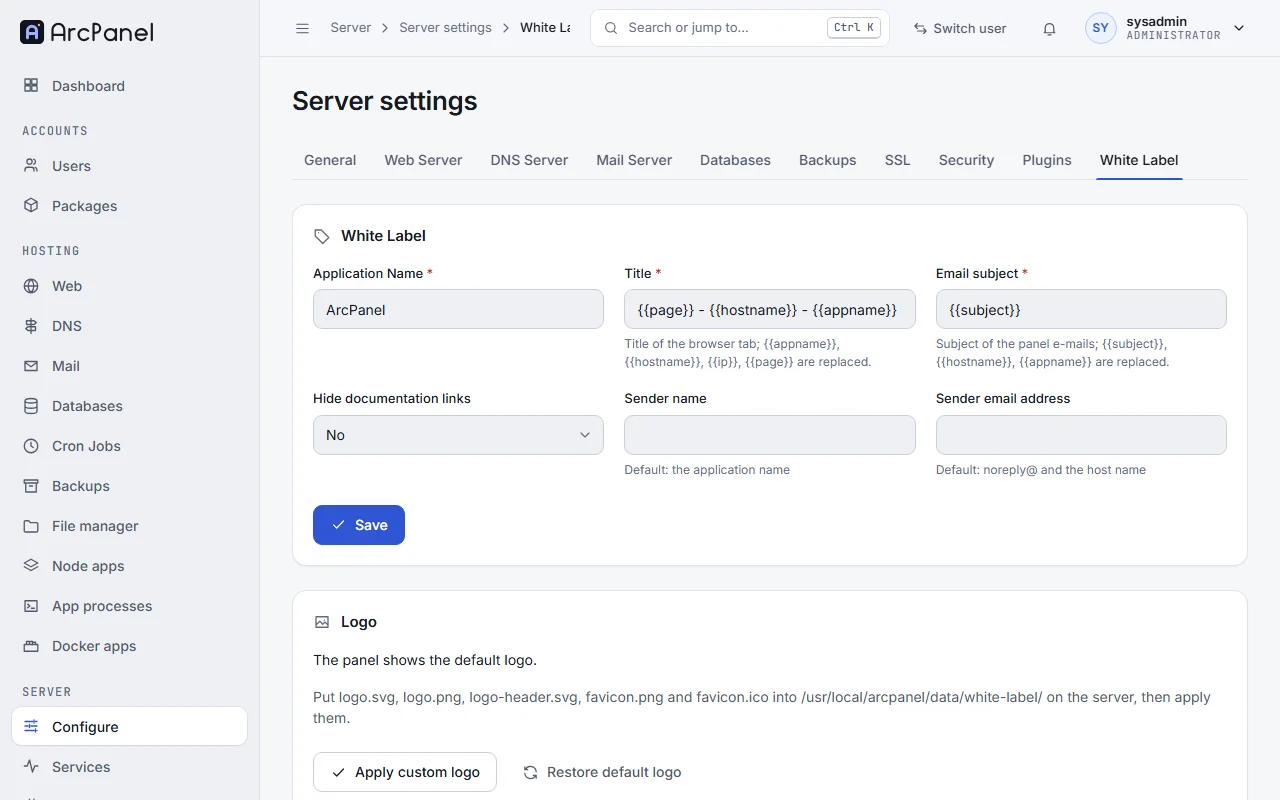
The e-mails are the welcome mail of a new account, FTP and mailbox details, and password resets.
Title and Hide documentation links are kept from HestiaCP; the panel of ArcPanel 2.2 does not use them. The browser tab always shows the page and the Application Name.
v-change-sys-config-value APP_NAME "Example Hosting"
v-change-sys-config-value FROM_EMAIL support@example.com
Logo
The panel has no upload for the logo: put the files on the server, then apply them.
-
Copy your files to
/usr/local/arcpanel/data/white-label/on the server, with these names:File Used for logo-header.svgThe logo of the sidebar and of the login page, shown at once favicon.pngThe icon of the browser tab, after you apply the files logo.svg,logo.png,favicon.icoCopied as well, for older pages that still use them -
Click Apply custom logo, or run
v-update-white-label-logo. The tab then says "The panel shows your custom logo."
The files are not resized or checked: use an SVG drawn for a small height, and a square icon of 32 or 64 pixels.
Restore default logo brings back the ArcPanel logo and deletes your files from that folder; it downloads the default logo, so the server needs internet access.
v-update-white-label-logo
v-update-white-label-logo yes yes
What stays
White label changes what users see in the panel and in its e-mails. It does not change the names of commands, services, packages or paths on the server, and the login page of webmail and phpMyAdmin keeps their own look.
Next steps
- Server settings for the other tabs.
- Users and packages to prepare packages for your customers.