A reseller is an account that hosts customers. The reseller creates and manages its customers in the panel, gives them packages, and shares its own limits with them: everything its customers use counts against the reseller's package. Customers are ordinary users and do not know about the reseller's other customers.
Before the first reseller
A fresh server needs one change before a reseller can add customers: a package the reseller may give. No shipped package is available to resellers, so a new reseller's Packages page says "No packages yet".
- Open Packages, Copy
defaultto a new package, for examplestarter, and edit it. - Give every limit a number instead of Unlimited, for example 5 web domains, 5 DNS zones, 5 mail domains, 25 mail accounts, 5 databases, 5 cron jobs and 5000 MB of disk and bandwidth. A reseller's limits are numbers, so a package with an unlimited value never fits into them: the reseller gets "The plan has no room for WEB_DOMAINS."
- In the Reseller card, turn on Available to resellers, and save.
Resellers whose package lists * under Packages the reseller may assign, like the shipped reseller package, may now give starter.
Create a reseller
- Open Users › Add User.
- Choose the
resellerpackage, or another package with Customers above 0, and set Role to Reseller. - Finish the wizard.
An existing user becomes a reseller on the Administration tab of its edit page, once its package allows customers.
The reseller package
The Reseller card of a package, visible to administrators only, sets:
| Field | Meaning |
|---|---|
| Customers | How many customers the reseller may have; 0 means the package is not for resellers |
| Packages the reseller may assign | Package names separated by commas, or * for every package marked Available to resellers |
| Available to resellers | Whether resellers whose package allows * may give this package |
The shipped reseller package allows 25 customers, 100 web, DNS and mail domains, 1,000 mailboxes, 100 databases, 100 GB of disk and a pool of 100 ports, and may assign *.
The shared quota
The reseller's package is a budget for the reseller and its customers together. When the reseller adds a customer or changes a customer's package, the panel adds up the reseller's own usage and the limits of every customer's package, and refuses the change when the total would pass the reseller's limits. The user page of the reseller shows this as the Reseller plan; the reseller sees it as Plan on its dashboard.
Because the limits of customers' packages are added up, a package with an Unlimited limit cannot be given by a reseller whose own limit is a number.
Usage totals are counted again each night, and after every change to a customer.
v-update-reseller-counters all
v-list-reseller-users reseller1
What a reseller does
Resellers see Customers instead of Users in the sidebar, and Packages with the packages they may give.
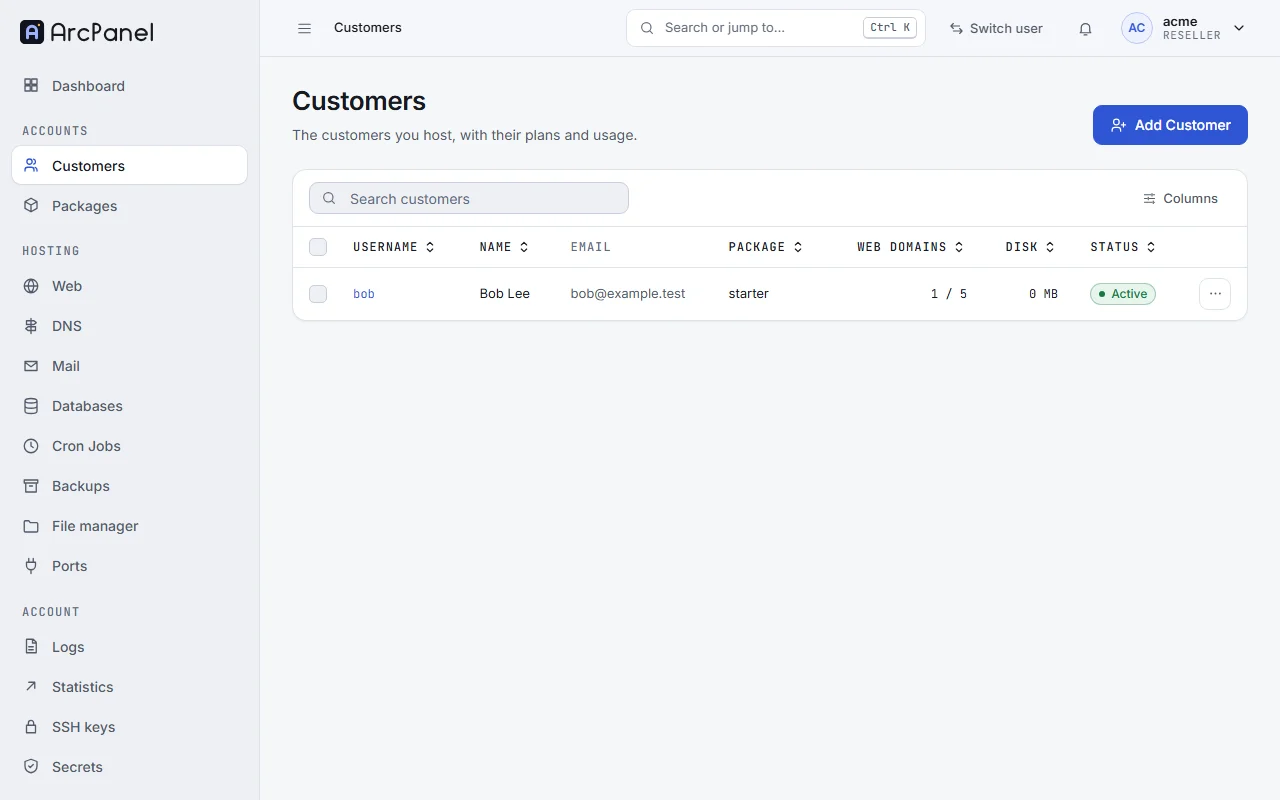
- Add Customer runs the same wizard as for administrators, without Role and Owner. The Package step checks the plan as you type and says when it has no room left.
- Log in as opens the panel as a customer, to help them. Administrators can turn this off with
v-change-sys-config-value POLICY_RESELLER_LOGIN_AS no. - Ports › Give ports hands ports of the reseller's pool to a customer, for Node.js and Docker apps.
- The reseller manages its own web domains, mail and the rest like any user.
Packages of their own
By default, resellers give only the packages the administrator made available. To let them make their own, run:
v-change-sys-config-value POLICY_RESELLER_CREATE_PACKAGES yes
A reseller's packages cannot pass the reseller's own limits, are visible only to that reseller, and may use only the shells listed in Shells resellers may give in their packages (Server › Configure › Security; nologin by default).
What administrators see
- The Users list has Role and Owner columns; All roles › Reseller lists the resellers, and All owners a reseller's customers.
- The Owner tree tab shows every reseller with its customers.
- A reseller's page shows its Reseller plan and its Customers.
- Owner on a user's Administration tab moves a customer to another reseller, or to the administrator (
v-change-user-owner).
Things to know
- Suspending a reseller does not suspend its customers: suspend them as well if you need to.
- A reseller with customers cannot be deleted or made a user in the panel. Move its customers to another owner first. The commands
v-delete-userandv-change-user-roledo not check this: customers left without their reseller fall back to the administrator. - Resellers do not nest: a reseller's customers are always users.
From the command line
v-add-reseller-user reseller1 bob 'Str0ng-pass' bob@example.com starter
v-change-reseller-user-package reseller1 bob starter-plus
v-list-reseller-packages reseller1
v-check-reseller-quota reseller1 starter-plus bob
Next steps
- Users and packages for the package fields.
- Port registry for the reseller's pool of ports.