Server-wide settings are under Configure in the Server part of the sidebar, for administrators only. The page has the tabs General, Web Server, DNS Server, Mail Server, Databases, Backups, SSL, Security, Plugins and White Label; the DNS, mail and database tabs appear when those services are installed.
Each tab saves only what you changed, one command per change. If a change fails, the page says which one, and the changes before it stay applied.
General
| Field | What it does |
|---|---|
| Hostname | The server's host name. It does not issue a certificate for the new name; see SSL |
| Time Zone | The server's time zone, used by cron jobs and backups |
| Default Language | The language of the panel; Set as default language for all users applies it to every account |
| Theme | auto, light or nocturne; Allow users to change their theme lets users pick their own |
| Debug Mode | Keeps more output in the logs, such as the output of service restarts in /var/log/arcpanel/debug.log |
| Enable preview features | Shows options that are still being tested |
Version shows the installed ArcPanel version.
v-change-sys-hostname panel.example.com
v-change-sys-timezone Europe/Berlin
Web Server
The tab names the Web Server, Proxy Server and Backend Server, each with a link to its configuration file, and sets the Default PHP Version: the version of the php command and of web domains on the default backend template. Open the PHP page manages the PHP versions (System packages).
DNS Server
The tab names the DNS Server, shows whether DNSSEC is Supported, and lists the DNS Cluster hosts. Cluster hosts are added on the command line; DNS explains clusters and what DNSSEC needs.
Mail Server
| Field | What it does |
|---|---|
| Webmail Alias | The name of webmail under each mail domain, webmail by default |
| Webmail Port | The port of webmail on the panel host, 8086 by default; empty turns it off |
| Open Webmail on | The webmail port of the panel host or The webmail alias of each mail domain |
| Global SMTP Relay | Send all outgoing mail through another SMTP server: Host, Port (587 by default), Username, Password |
The tab also names the Mail Server, the IMAP/POP3 Server and the Antispam. A mail domain's own relay takes precedence over the global one (Mail).
The panel's own e-mails (welcome mails, password resets, notifications) go out through the local mail server. To send them through an SMTP account instead, use v-add-sys-smtp; it has no field on this tab.
Databases
| Field | What it does |
|---|---|
| phpMyAdmin Alias | The path of phpMyAdmin (and phpPgAdmin Alias with PostgreSQL) |
| Database Tools Port | The port of phpMyAdmin on the panel host, 8087 by default; empty turns it off |
| phpMyAdmin Single Sign On | Users open phpMyAdmin from the Databases page without a password |
| Restrict phpMyAdmin access | With single sign-on on: only single sign-on logins reach phpMyAdmin |
Database hosts lists the database servers with how many databases each holds. Change password sets a new password for the administrator account of a MySQL or MariaDB host (8 to 256 characters, without quotes or backslashes). Hosts are added on the command line:
v-add-database-host mysql db2.example.com root 'the-password' 500
Backups
Local Backup, Compression (zstd or gzip), Compression Level, Remote Backup and Incremental Backups: Schedule backups walks through each of them.
SSL
The tab shows the panel's certificate: Subject, Aliases, Issued By, Valid From, Valid To, Signature and Key Size. Paste another SSL Certificate and SSL Private Key to replace it, or use Generate CSR to make a key and a certificate request for a certificate you buy.
The panel's Let's Encrypt certificate is issued for the host name by the installer, at the first boot. After you change the Hostname, issue one for the new name:
v-add-letsencrypt-host
It creates a web domain for the host name if there is none, issues the certificate and installs it for the panel and the mail server; renewals then follow the domain's certificate.
Security
API
| Field | What it does |
|---|---|
| API | Disabled, Enabled for the system administrator, or Enabled for every user |
| REST API v1 | API v1, for older scripts; off by default |
| Legacy API | The oldest form of API v1; it needs REST API v1 |
| Allowed IP addresses for API | One address per line; allow-all accepts every address |
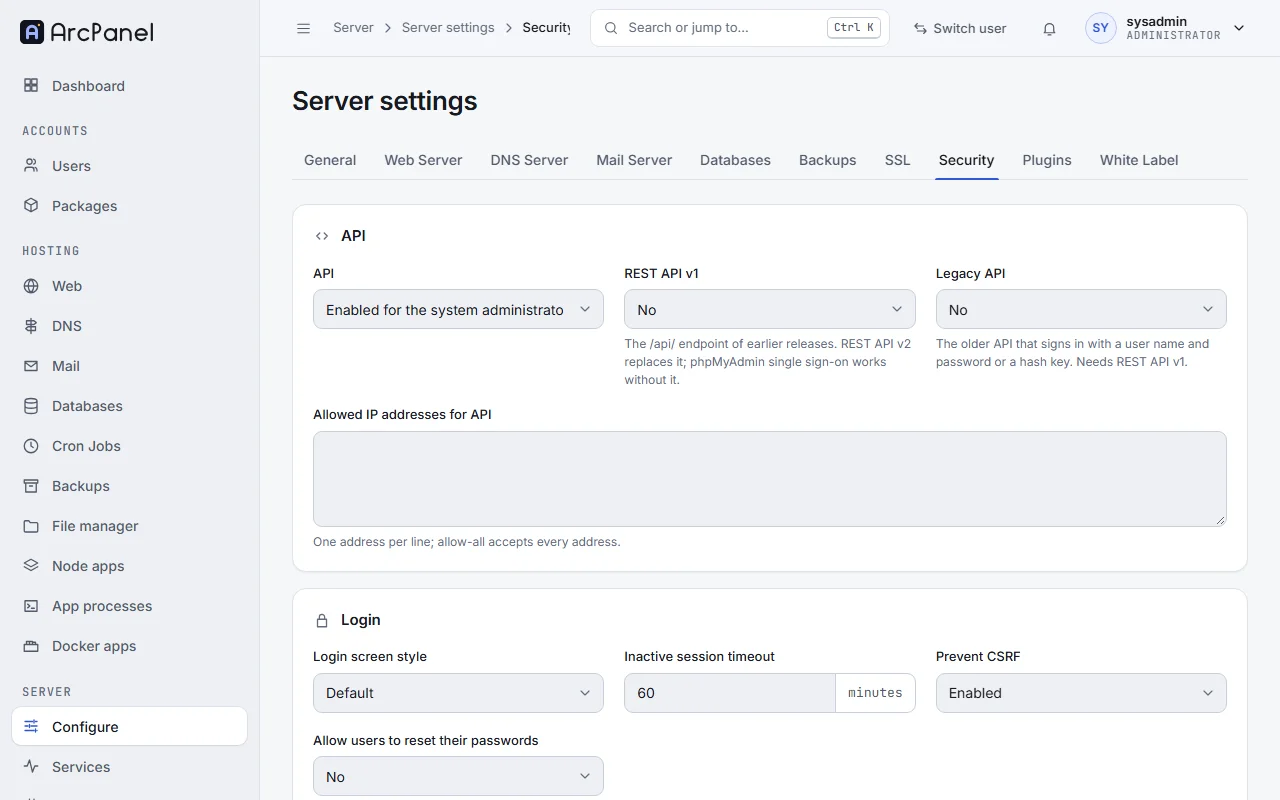
REST API v2 accepts a request only from an address on this list. After a fresh install the list is empty, so the API refuses every address until you add yours.
v-add-sys-api-ip 203.0.113.10
Login
- Inactive session timeout: minutes without activity before the panel signs a user out (60 by default; 0 never).
- Allow users to reset their passwords: shows Forgot Password on the login page.
- Login screen style and Prevent CSRF are kept from HestiaCP; the panel of ArcPanel 2.2 does not use them.
System protection
For the first administrator only: Restrict access to read-only for other administrators, Hide the system administrator account from other administrators and Hide the services page from other administrators.
Users
What users may do: Allow users to change templates when editing web domains or when editing DNS zones, Allow users to view action and login history logs, Allow users to delete log history, Allow suspended users to create new backups, Sync error documents on update and Sync the skeleton directory on update, and the Shells resellers may give in their packages (Resellers). Allow users to edit their account details has no effect in ArcPanel 2.2.
Domains
Enforce subdomain ownership refuses a subdomain whose main domain belongs to another user, such as shop.example.com when another account owns example.com.
Plugins
Quick Install App lets users install web applications on their domains. Below it, each optional part can be installed or removed, as a task in the background:
| Plugin | What it adds |
|---|---|
| File Manager | The file manager |
| Web Terminal | A terminal in the browser, for users with SSH access |
| Resource Limits | CPU and memory limits per user, in the packages (cgroups) |
| Disk Quota | Disk quotas per user |
| Firewall | The iptables firewall and Fail2Ban (Firewall) |
| Malware scan | Malware scans of the users' files |
White Label
The application name, the sender of e-mails and the logo: see White label.
From the command line
v-list-sys-config json
v-change-sys-config-value INACTIVE_SESSION_TIMEOUT 120
Configuration files describes the keys of the configuration.