When the server hosts a domain's DNS, ArcPanel keeps its zone: the records that send visitors to the website and mail to the mail server. Set up mail and DNS covers the first zone; this guide covers the rest.
Zones
Open DNS in the sidebar. The list shows each zone with its records, Template, TTL, SOA, DNSSEC, Expiration Date and status. Add DNS Domain creates a zone; a zone is also created when you add a web domain with Create DNS zone on.
Click Edit DNS Domain in a zone's menu to change:
| Field | Meaning |
|---|---|
| IP Address | The server address in the zone's records. Changing it replaces the old address in every record |
| Template | The set of records the zone is built from (below) |
| SOA | The primary name server of the zone, such as ns1.example.net |
| Expiration Date | A reminder of when the domain registration ends (YYYY-MM-DD); it does not change DNS |
| TTL | How long, in seconds, other servers may cache the records. New zones use 14400 (4 hours) |
ArcPanel raises the zone's serial number on every change, so the other name servers pick the change up.
Records
Click a zone to open its DNS Records. Add Record opens a form with Record (the name, @ for the domain itself), Type, IP or Value, Priority (MX and SRV only) and TTL (empty means the zone's TTL). Click a record's name to edit it.
The types are A, AAAA, CAA, CNAME, DNSKEY, DS, IPSECKEY, KEY, MX, NS, PTR, SPF, SRV, TLSA and TXT. Common records:
| Record | Type | Value | For |
|---|---|---|---|
shop |
A | 203.0.113.10 |
A subdomain on another server |
@ |
TXT | google-site-verification=… |
Proving you own the domain |
@ |
CAA | 0 issue "letsencrypt.org" |
Only Let's Encrypt may issue certificates |
_sip._tcp |
SRV | 10 5060 sip.example.com |
A service on a given port |
Names and values of NS, CNAME, MX, PTR and SRV records get their final dot added for you. Suspend leaves a record out of the zone without deleting it.
v-add-dns-record alice example.com shop A 203.0.113.10
Templates
A template is the set of records a new zone starts with:
| Template | Records |
|---|---|
default |
Web, mail and webmail on this server, with SPF and DMARC |
default-nomail |
Web only, no mail records |
gmail |
Web on this server, mail at Google Workspace |
office365 |
Web on this server, mail at Microsoft 365 |
zoho |
Web on this server, mail at Zoho Mail |
child-ns |
For a domain whose own name servers are on this server |
Warning
Changing a zone's Template rebuilds all of its records from the template. Records you added yourself are lost. Note them first, or add them back after the change.
Administrators set which template new zones use in the package, and whether users may change templates.
Name servers
Zones list the name servers of their owner, set in the package (Name servers) or on the user's Name servers tab: two to eight names. Changing them applies to new zones. Existing zones keep their NS records: change those on the zone's DNS Records page.
Register those names at the domain registrar, with glue records pointing to the server, and set them as the domain's name servers there.
DNSSEC
DNSSEC signs the zone so that resolvers can tell it was not tampered with. The zone pages offer it only when the cluster mode is arcpanel-zone. A new ArcPanel 2.2 server uses the mode arcpanel, so Enable DNSSEC is missing even though Server › Configure › DNS Server shows DNSSEC as Supported. As administrator, switch the mode once:
v-change-sys-config-value DNS_CLUSTER_SYSTEM arcpanel-zone
The mode only decides how zones are copied to DNS cluster hosts (see below). Then:
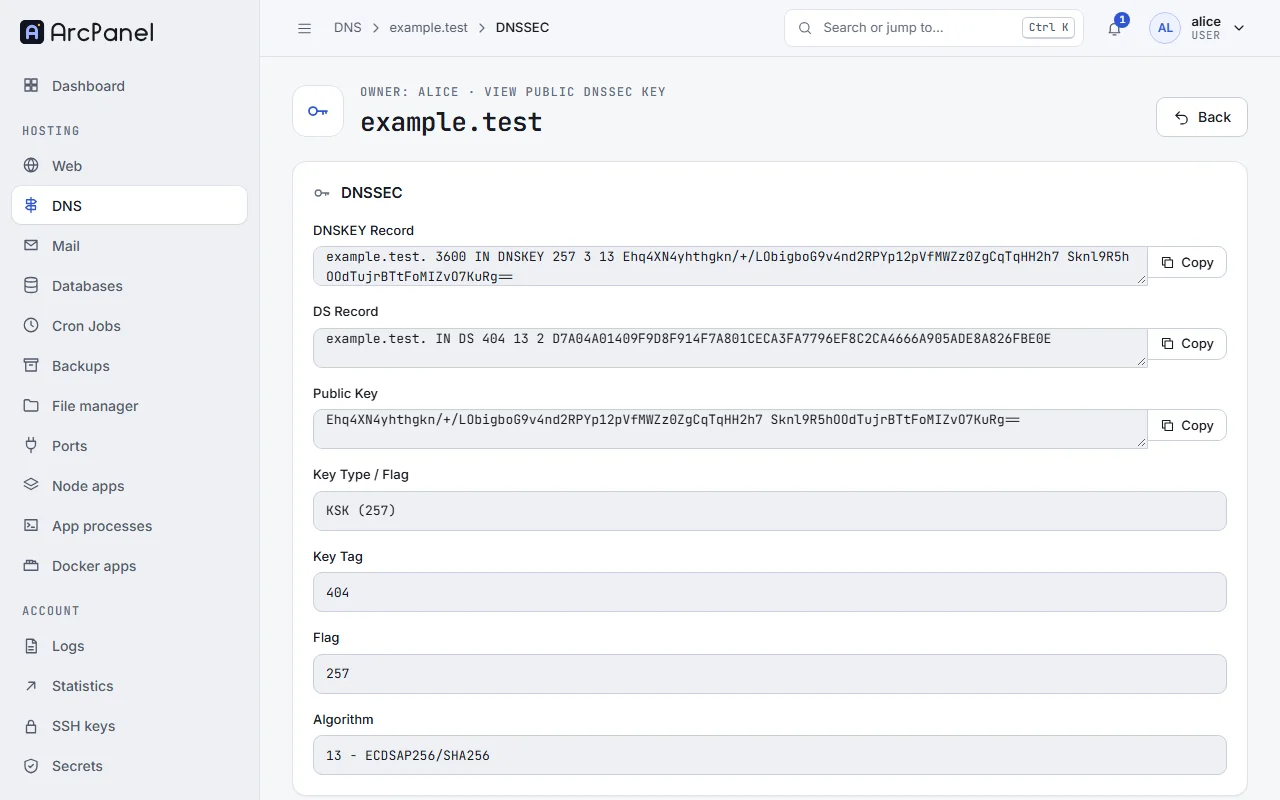
- Edit the zone, turn on Enable DNSSEC and Save. The zone page now shows DNSSEC: Enabled.
- Click View Public DNSSEC Key, on the zone page or in the zone's menu. It shows the DNSKEY Record and the DS Record, each with Copy.
- Enter the DS record at your registrar.
Caution
Turn DNSSEC off at the registrar (remove the DS record) before you move the zone elsewhere or turn it off here, and wait a day. Otherwise the domain stops resolving for everyone who checks DNSSEC.
DNS clusters
Several ArcPanel servers can share their zones, so that each domain has name servers on more than one machine. The DNS Server tab of Server › Configure lists the DNS Cluster hosts. Hosts are added on the command line of the server that holds the zones:
v-add-remote-dns-host ns2.example.net 8083 the-api-key '' api
Replace the-api-key with an API key of the other server, and leave the password empty.
The other server must have REST API v1 turned on. Zones are then copied to it and kept in step: as secondary zones by zone transfer when the cluster mode is arcpanel-zone, or as copies of the record files otherwise.
Suspend and delete
Suspend in a zone's menu stops the server answering for that domain; Unsuspend turns it back on. Delete removes the zone. Neither changes the registration at your registrar.
Limits
The package sets DNS Zones (how many zones a user may have) and DNS Records (per zone).
Next steps
- Mail for the mail records.
- Web domains and templates for aliases, which add their DNS records for you.